What is the difference between a barcode printer and a label printer?
A barcode printer is specifically designed to print barcode labels, which contain machine-readable information in the form of parallel lines and spaces. On the other hand, a label printer is more versatile and can print various types of labels, including barcode labels, address labels, and product labels.

Key Highlights
- In many fields like logistics, keeping track of inventory and assets is crucial. Barcode and label printers play a big role in this.
- You can find various kinds of barcode label printers out there, such as ones for heavy-duty use, those that fit on your desk, and even portable ones you can carry around.
- When it comes to making these printers, companies like Zebra, Honeywell, and Datamax are at the forefront.
- Zebra Technologies stands out by creating top-notch industrial barcode printers along with RFID technology to keep things organized.
- Brother has made its mark too by developing not just desktop printers but also specialized wristband printing devices.
- Citizen Systems earns recognition through their focus on crafting durable thermal transfer labels known for reliability and innovation.
- -With Toshiba Tec’s offerings blending old-school dependability with modern tech features providing sturdy industrial barcode label printer options.
Introduction
In many industries, having printers for barcodes and labels is super important to keep track of assets and manage inventory well. It’s key to know about the different kinds of these printers because it can really help make things run smoother. You’ve got everything from ones that fit on a desk to big industrial ones, each designed for certain jobs. There are also cool advancements like printing without liners which is better for our planet. When you’re looking into getting one, checking out top brands like Zebra Technologies, Brother, Citizen Systems, and TSC is a smart move. So let’s get into more details about barcode and label printing.
Types of Barcode Label Printers
Mobile barcode label printers are great for tasks that need you to move around because they’re easy to carry. For jobs that aren’t too big but still need efficiency, desktop barcode printers are a good fit. When it comes to printing a lot of labels quickly and wanting them to last, industrial barcode label printers are up for the challenge with their speed and durability. Linerless barcode label printers cut down on waste by getting rid of the backing paper, making them an environmentally friendly choice. Each kind is designed with certain needs in mind, offering flexibility across different fields.
Overview of Mobile Barcode Label Printers
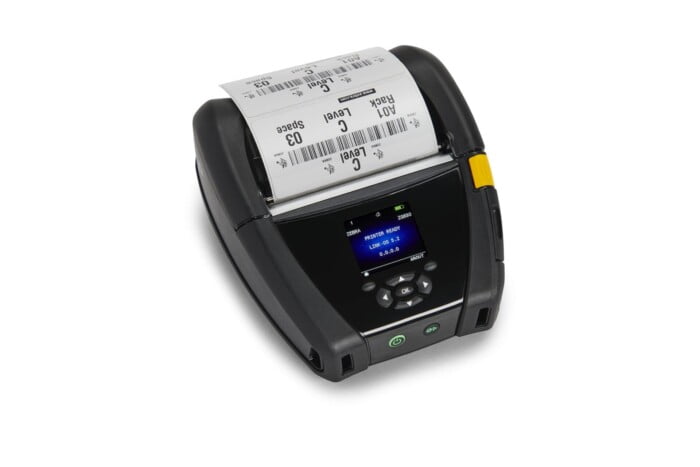
Mobile barcode label printers are handy, easy-to-carry gadgets perfect for printing while you’re moving around. They’re really flexible and work great in different areas such as shops, storage places, and the movement of goods. Most of these printers use a method called thermal printing which makes them super quick at making labels without any fuss. Thanks to their ability to connect wirelessly, they fit right into your current setup, helping you manage information on the spot. These printers are a big help when you need to keep track of things or control stock because they make it easier and more accurate to do tasks like asset tracking and inventory control wherever you go.
Desktop Barcode Label Printers and Their Advantages
Desktop printers are really handy and flexible, making them a great choice for small to medium-sized businesses. They’re good at printing labels on the spot without costing too much, and they can print things very clearly. With these printers, it’s easy to connect them with programs you already use for keeping track of inventory or assets. They’re simple to use so you won’t need much training to get started. By speeding up how fast you can make labels for products or shipping items, desktop printers help your business run smoother and more efficiently. Plus, if you don’t have a lot of room, these compact devices are perfect because they still deliver high-quality labels suited for all sorts of needs.

Industrial Barcode Label Printers for High-Volume Needs
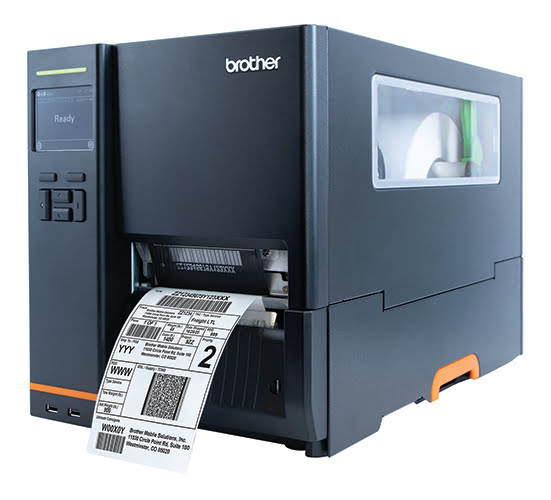
In industries such as manufacturing, distribution centers, and logistics where there’s a lot of work to do all the time, industrial barcode label printers are super important. These tough printers are made for non-stop printing jobs so everything runs smoothly. They’re built strong, can print quickly, and work with different sizes of labels. This means they give you top-notch barcode labels that help keep track of things and manage inventory in places where the work never stops. Because they perform so well, companies that need to print a lot always go for these printers when it comes to handling their high-volume printing needs, such as asset management, shipping, manufacturing, and receiving.
Innovations in Linerless Barcode Label Printers
In the world of barcode label printers, there’s a cool shift towards being more eco-friendly and efficient. These linerless printers are doing away with the need for that extra backing paper, which means less trash and more savings. Thanks to better sticky stuff technology, these labels stick around longer and tougher, making them perfect for different fields like food services and logistics. The big win here is how everything gets smoother – from cutting down on waste to boosting how well labels work without making our planet sad.
Leading Manufacturers in the Barcode Printer Industry
In the world of barcode printers, companies like Zebra Technologies, Brother, Citizen Systems, and Toshiba Tec stand out as top contenders. With Zebra leading the pack by providing a variety of solutions tailored to different needs. On one hand, Brother is known for its innovative approach; on the other hand, Citizen impresses with its blend of reliability and innovation. Meanwhile,Toshiba Tec skillfully combines traditional methods with modern technology to cater to diverse printing demands efficiently. These key players demonstrate their mastery in the field through an array of products designed specifically for meeting the changing requirements of barcode printing effectively.
Zebra Technologies: A Pioneer in Barcode Printing
Zebra Technologies is a leader in the world of barcode printing, known for coming up with new and smart ways to handle it. They’re really good at making thermal barcode printers and software that helps keep track of things like assets, what’s in stock, and how distribution centers run. Because their industrial printers are so reliable and tough, lots of different places choose them for all sorts of jobs. Zebra keeps focusing on being top-notch when it comes to quality and getting things done efficiently as they continue setting the pace in providing solutions for barcode printing needs. With their innovative RJS Inspector 5000 Laser Barcode Verifier, Zebra Technologies is a pioneer in ensuring the accuracy and reliability of barcode printing. This advanced technology includes a battery charger and a lithium ion integrated battery pack, making it a convenient and efficient solution for businesses.
Brother’s Contribution to Barcode Label Printing
Brother, a big name in the game, has a bunch of barcode and label printers that fit all kinds of work needs. These printers are top-notch when it comes to being precise, flexible, and getting things done fast. They’re perfect for both small businesses and huge companies. Brother is really into coming up with new stuff to make printing barcodes better and making your job easier. Known for their good quality and how well they perform, Brother keeps playing a key role in the world of barcode printing.
Citizen Systems: Reliability Meets Innovation
Citizen Systems stands out by mixing dependability with creativity in their barcode printers. They put a lot of emphasis on making sure their printers are tough and perform well, which is why they’re recognized for producing top-notch work and having cool features. With industrial printers designed to meet the challenging requirements of different sectors, Citizen ensures smooth running and trustworthy printing solutions for barcodes. Their dedication to bringing new ideas to life and maintaining high standards in product quality has made them a go-to option for companies looking for reliable barcode printing tech.
Toshiba Tec Barcode Printers: Bridging Tradition and Technology
Toshiba Tec barcode printers mix old ways with new tech, making them perfect for different kinds of work. They’re really reliable and accurate, which makes them great for busy places like distribution centers and factories. Toshiba Tec keeps up with the newest in barcode printing to help keep track of things and manage inventory better. With their eyes on bringing something new to the table and keeping quality high, Toshiba Tec is a name people trust in industrial printing, helping companies all over meet their needs.
Choosing the Right Printer for Your Needs
When picking the perfect printer, it’s important to think about a few things. First off, decide between thermal transfer and direct thermal types because they both have their perks. You also want to make sure your barcodes look clear by choosing a printer with just the right resolution. On top of that, check if the printer works well with your system’s software. With connectivity options like wired or wireless setups being crucial for how smoothly everything runs, finding a printer that fits exactly what you need, including POS receipt printing, is essential for boosting productivity and making operations smoother in label printing and barcode creation tasks.
Factors to Consider When Selecting a Barcode Printer
When thinking about getting a label printer that can handle barcodes, it’s smart to look at what you really need. Think about how much printing you’ll do, the quality of print you want, and how it connects to other devices. You should decide between a thermal transfer or direct thermal type based on your situation, and consider getting thermal labels specifically designed for thermal barcode printers. For places like factories, check how tough the printer is and what keeping it running will cost. Making sure it works well with barcode software and scanners makes everything run smoothly. Also, consider if the printer is reliable for the long haul and what kind of help the company making it offers if things go sideways.
Comparing Thermal Transfer vs. Direct Thermal Printers
Thermal transfer printers work by heating up a ribbon, such as a thermal transfer ribbon, to create labels that can stand up to tough conditions, like high temperatures and harsh chemicals. This makes them great for places where the labels need to last a long time. With direct thermal printing, there’s no need for a ribbon, which cuts down on costs. This method is perfect for things like shipping labels that don’t have to stick around forever. Knowing how these two types of printing differ is key when you’re trying to pick the best printer for what you need it do.
The Importance of Printer Resolution in Barcode Clarity
When it comes to ensuring that barcodes are clear and scannable, the quality of your printer plays a crucial role. This quality is determined by the printer’s resolution, which refers to the number of tiny dots it can print per inch. Printers with higher resolutions produce sharper and more detailed barcodes, making it easier for barcode scanners to read them accurately.
Barcode scanners rely on crisp and clear barcode images to function effectively. If your printer has a low resolution, you may end up with blurry or distorted barcodes, making scanning difficult or impossible without adjustments.
Leading manufacturers such as Zebra, Honeywell, and Sato offer a range of barcode and label printers with different print resolutions to suit various needs. These printers are available in 200 dpi, 300 dpi, and 600 dpi resolutions, ensuring that you can choose the right one for your specific requirements.
Specialty Printers: Linerless Label Printers
Linerless label printers are a cool kind of printer that’s really good for the planet and helps you get your work done faster. Unlike the usual printers for labels, which need a special paper behind each sticker, these don’t. They have this smart sticky stuff that lets you print stickers one after another on a long roll without needing any backing paper.
By not using liners, linerless label printing cuts down on trash a lot, making it super eco-friendly. Plus, it makes printing stuff way easier because you’re not always having to swap out rolls of labels or deal with throwing away the used liner bits. For businesses that need to print loads of labels like stores, shipping companies, and hospitals, these printers are perfect because they save time and help take care of our planet.
The Environmental Benefits of Linerless Labels
Linerless labels are getting more attention these days because they’re good for the planet. Without needing a liner backing, these labels help cut down on trash and make packaging more eco-friendly. When it comes to label printing, the usual way creates a lot of waste from liners that’s hard to recycle or throw away in an environmentally friendly manner.
With linerless label printers, things get greener by printing directly onto rolls without any backing paper. This approach doesn’t just lower waste; it also cuts down on the carbon footprint caused by making and moving liner materials around.
On top of being better for Earth, linerless labels have some handy perks too. They’re simple to use, don’t cost much money over time, and you can use them for lots of different things like putting info on products,shipping, keeping track of inventory – pretty much anything where you need a sticker or label! All in all,linerlesslabels stand out as not only an earth-loving option but also as something that makes managing stuff smoother while sticking with responsible packaging practices.
Use Cases for Linerless Label Printers in Various Industries
Linerless label printers are becoming more and more popular in different fields because they’re really handy and offer some great perks. Let’s talk about how they’re being used:
- In healthcare, these printers are super useful for things like making sure patients have the right labels, keeping track of medications, and following where samples go. They help keep everything accurate and running smoothly when there’s no time to waste.
- For retail stores, linerless labels are perfect for pricing items, marking shelves, or showing off sales without a hassle. Stores can change prices or info on products easily which saves money and makes life simpler.
- When it comes to shipping stuff around or managing warehouses logistics love using linerless labels too. They make printing lots of labels quick which helps with keeping an eye on packages better through scanning barcodes ensuring nothing gets lost while moving from point A to B.
These examples just scratch the surface of what you can do with linerless label printers across various sectors Their ability to adapt save resources ,and boost efficiency is why so many industries find them invaluable.
Understanding Printer Connectivity and Software
When picking out a barcode or label printer, it’s really important to think about how it connects and the software it uses. USB and Ethernet connection are the most popular connectivity options for barcode label printers, however many of the manufacturers also offer wireless – WiFi connectivity and Bluetooth connectivity. Having different ways to connect and compatible software can make printing a lot smoother and help everything work better together.
With wireless connectivity, printers can link up with networks and other devices without needing any wires. This is super handy in lots of places because you don’t have to deal with cables everywhere. But for jobs where you absolutely need your printer not to lose connection, having a wired option is key since it’s more stable.
Then there’s barcode software which is super crucial if you’re into barcode or label printing. It lets people create barcodes, keep track of their label designs, and even hook up the printing process with other systems they use. Making sure that this software works well with your printer and inc connectivity means everything will run smoothly without any hiccups.
Wired vs. Wireless: Which Connectivity Works Best?
When it comes to choosing between wired and wireless connections for printing, it really boils down to what you need and how your print setup is laid out.
With a wireless connection, you get the freedom to move your printers around without worrying about cables. This can be super handy in places where things change a lot or if you have to shift printers here and there. Going wireless also means less mess from all those wires and an easier time getting everything hooked up. With Bluetooth connectivity, you can even connect via a mobile phone or tablet for easy access.
On the flip side, going with a wired connection gives you a steadier link that won’t let you down when printing is absolutely critical. You won’t have issues like signal drops or too many devices clogging up the network. So, if your work demands fast-paced printing without any hiccups, sticking with cables might be best.
In the end, whether wired or wireless works better depends on stuff like where you’re setting up shop, how much moving around of equipment there’ll be, and just what kind of printing tasks are on deck.
Software Compatibility: Ensuring Your Printer Matches Your System
When picking out a label printer or barcode machine, making sure it works well with the software you already have is key for everything to run smoothly.
The role of barcode software is pretty big since it helps create barcodes, manage how labels look, and makes sure printing fits right in with other work stuff. Since printers can be picky about what software they get along with, finding one that matches the barcode program your place uses matters a lot. It is important to note that the barcode printers all work with barcode software like BarTender barcode software, NiceLabel Barcode software, or Teklyn barcode software.
Having a printer and software that understand each other means things go without a hitch – your workflow stays fast, prints come out right, and customizing designs or connecting systems isn’t tough. So before you decide on buying any printer, double-check if it’s going to play nice with the barcode tools you’re aiming to use.
Maintenance and Troubleshooting Tips
To make sure your barcode and label printers last a long time and work well, it’s important to take good care of them. Here are some ways you can keep your printer in great shape:
- Regularly clean the printhead, swap out parts that are wearing out, and adjust the settings on your printer.
- Choose top-notch labels and ribbons that match with what your printer needs so you don’t mess it up.
- Teach people how to use the printer correctly so they don’t accidentally break it by making mistakes.
- Keep up with new updates for software or firmware from whoever made your printer.
- Write down how well your printer is doing over time; this helps spot any problems early.
By sticking to these tips for maintenance and fixing issues when they pop up, companies can really get their money’s worth from their barcode and label printers while keeping print quality high.
Routine Maintenance for Longevity and Reliability
To keep your printer, especially if it’s for barcode and printing tasks, working well and lasting longer, it’s super important to take good care of it. Setting up a regular check-up plan can save you from the headache of sudden breaks or having to shell out cash for big fixes. Here are some tips on what you should do:
- With cleaning the printhead often, you get rid of dust or little bits that mess with how things look when printed.
- By checking and swapping out parts like belts and rollers that have seen better days, you dodge paper jams and make sure everything runs smoothly.
- Calibrating the printer now and then keeps your prints lined up right so barcodes scan without a hitch.
- Making sure where your printer sits is clean and not dusty helps stop gunk from messing with how well your printer works.
Sticking to these maintenance steps means businesses can count on their barcode printers more reliably over time while dodging annoying breakdowns.
Common Issues and How to Solve Them
Barcode and label printers sometimes run into problems that can mess up your workday and slow things down. You might face issues like paper getting stuck, the print not looking good, or trouble connecting to other devices. Here’s how you can fix these common problems:
- When dealing with paper jams, look for anything blocking the way of the paper and gently take out any stuck pieces without ripping them.
- For prints that don’t come out right, inspect the printhead for dirt or damage. Clean it or swap it out if needed. Also, make sure all your printer settings are as they should be.
- With connectivity troubles, check if there’s a problem with your network connection or cables. Make sure everything is hooked up correctly.
Sometimes mistakes made by users or wrong printer settings cause these headaches. Teaching people how to use their printers properly and solve simple issues on their own could keep printing smooth sailing.
Future Trends in Barcode Printing
Barcode printing is getting better and smarter to keep up with what companies need. Here’s what’s coming:
- With the Internet of Things (IoT), barcode printers are connecting more easily with other devices, making everything work together smoothly.
- Printers are also getting faster and producing higher quality prints. This means businesses can print barcodes quickly without losing any detail.
- More and more, you can use your phone or tablet to control these printers. This makes it super easy to print from anywhere.
These updates in barcode printing technology aim at making things quicker, clearer, and simpler for all kinds of businesses.
The Role of IoT in Evolving Barcode Label Printers
The Internet of Things (IoT) is changing the game in label printing, especially when it comes to barcode labels. By connecting printers with other tech like smartphones and tablets, as well as software for managing inventory, everything works together more smoothly.
With IoT on board, these printers can get updates straight from databases or systems that manage orders. This means they can print labels automatically and get them right every time without someone having to type things in by hand. It’s a big help because it cuts down on mistakes made by people.
On top of this, printers that are hooked up to IoT can give businesses useful info about how the printing is going. They can see how much material they’re using and figure out if things are running efficiently.
In short, bringing IoT into barcode label printing boosts productivity and accuracy while giving everyone involved a clearer view of what’s happening. It turns these printers into must-haves for places where industrial printing happens.
Advances in Print Speed and Quality
With the latest improvements in how fast and well barcode and label printers work, businesses are seeing a big boost in how they operate. Companies making these printers are always trying to outdo themselves by creating machines that print faster and with better detail. This means barcodes, along with other important information, come out looking sharp and accurate thanks to the incorporation of high-quality bar code printing technology.
By printing quicker, companies can get their labels and barcodes ready at a much faster pace. This is super helpful for places like distribution centers or factories where they need to print lots of labels all the time.
On top of speed, the quality of what’s printed has gotten way better too. Now, barcode labels look clearer which makes them easier for scanners to read accurately. When you have higher-quality prints, it cuts down on mistakes during scanning which helps everything run smoother.
So basically, as these printers keep getting better at printing quickly without losing any quality along the way; businesses find it easier to do their thing efficiently thanks to improved barcode labels that scanners can easily read.
Conclusion
Wrapping things up, it’s really important to get the hang of what different companies that make barcode and label printers are all about. This helps a lot when you need to pick one out. If you’re looking for something to use on the go, sit at your desk with, or even something more heavy-duty for bigger jobs, there’s a printer just right for each situation. Some newer kinds don’t even use those sticky backings which is better for our planet. Also, keeping an eye on how these printers are starting to work with internet stuff and getting better at printing is key. Choosing wisely means thinking about how it connects, its print quality, and how much fuss it needs to keep going so everything runs smoothly in making labels or barcodes. It pays off big time if we stay up-to-date with this tech as it keeps changing.
Frequently Asked Questions
What Makes an Industrial Printer Different from a Desktop Printer?
Industrial printers and those you find on a desk aren’t the same beast. The main difference between industrial barcode printers and desktop barcode printers is as follows. Industrial printers are larger in size and built in a steel case, whereas desktop printers are smaller in size and built in a plastic case. Industrial printers are generally faster in print speed, hold ribbons that are 450 meters long, and can hold larger label rolls on 3-inch cores and 8-inch OD diameters. On the other hand, desktop printers are smaller in size, hold ribbons that are generally 70 meters or 300 meters in length, and can hold label rolls on 1-inch cores and 5-inch OD rolls. With industrial printers, they’re built tough to handle lots of printing in places that are rough around the edges. On the other hand, desktop printers fit better in an office or shop where things are quieter and there’s not as much to print. They’re good for when you need just a few pages here and there, unlike their industrial cousins that keep chugging along through thick and thin.
Can Linerless Label Printers Work with Any Type of Labels?
Linerless label printers are made to handle linerless labels, which stick on their own without needing a backing. Although these printers can manage different kinds of labels, making sure the printer and the labels match up is crucial. Different printers might need specific types of sticky stuff on the back of the labels. So, picking out labels that work well with your particular label printer is key for getting great results and clear prints.
How Do I Choose Between Zebra, Brother, and Toshiba Printers?
When you’re trying to decide if a Zebra, Brother, or Toshiba printer is the right fit for you, it’s all about what you need and what each brand brings to the table. With their strong build and top-notch printing quality, Zebra printers are perfect for tough jobs in big places like factories. On the other hand, Brother printers mix good value with flexibility really well; they’re great for smaller businesses or setting up an office at home. Toshiba hits that sweet spot between doing a solid job and not costing too much – making them pretty handy for lots of different situations. You should think about how much printing you’ll do, how fast you need it done, ways to connect your devices and how much money you want to spend before picking one.